• About PeterSIronwood

petersironwood

~ Finding, formulating and solving life's frustrations.

petersironwood

Tag Archives: usability

Problem Formulation: Who Knows What?

28 Friday Nov 2025

Posted by petersironwood in AI, creativity, design rationale, psychology, Uncategorized

≈ Leave a comment

Tags

AI, browser, HCI, problem formulation, problem framing, problem solving, query, search, seo, technology, thinking, usability, UX

Photo by Nikolay Ivanov on Pexels.com

This post focuses on the importance of discovering who knows what. It’s easy to assume (without thinking!) that everyone knows what you know. 

At IBM Research, around the turn of the century, I was asked to look at improving customer satisfaction about the search function on IBM’s website. Rather than using someone else’s search engine, IBM used one developed at IBM’s Haifa Research lab. It was a very good search engine. Yet, customers were not happy. By way of background, it’s worth noting that compared with many companies who have websites, IBM’s website was meant for a wide variety of users and contained many kinds of information. It was meant to support people buying their first Personal Computer and IT experts at large banks. It had information about a wide variety of hardware, software, and services. The site was designed to serve as an attractor for investors, business partners, and potential employees. In other words, the site was vast and diverse. This made having a good search function particularly important.  

A little study of the existing data which had been collected showed that the mean number of search terms entered by customers was only 1.2. What?? How can that be? Here’s a website with thousands of products and services and designed for use by a huge diversity of users and they were only entering a mean of 1.2 search terms? What were they thinking?!


Of course, there were a handful of situations when one search term might work; e.g., if you wanted to find out everything about a specific product that had a unique one-word name or acronym (which was rare). For most situations though, a more “reasonable” search might be something like: “Open positions IBM Research Austin” or “PC external hard drives” or “LOTUS NOTES training.” 

We invited a sample of users of IBM products & services to come into the lab and do some tasks that we designed to illuminate this issue. In the task, they would need to find specified information on the IBM website while I observed them. One issue became immediately apparent. The search bar on the landing page was far too small. In actuality, users could enter as many search terms as they liked. Their terms would keep scrolling and scrolling until they hit “ENTER.” The developers knew this, but most of our users did not. They assumed they had to “fit” their query into the very small footprint that presented itself visually. Recommendation one was simply to make that space much larger. Once the search bar was expanded to about three times its original size, the number of search terms increased dramatically, as did user satisfaction. 

In this case, the users framed their search problem in terms of: “How can I make the best query that fits into this tiny box.” (I’m not suggesting they said this to themselves consciously, but the visual affordance led them to that self-imposed constraint). The developers thought the users would frame their search problem in terms of: “What’s the best sequence of terms I can put into this virtually infinite window to get the search results I want.” After all, the developers knew that any number of terms could be entered. 

Although increasing the size of the search bar made a big difference, the supposedly good search engine still returned many amazingly bad results. Why? The people at the Haifa lab who had developed the search engine were world class. At some point, I looked at the HTML of some of the web pages. Many web pages had masses of irrelevant metadata. I found some of the people who developed these web pages and discussed things with them. Can you guess what was going on?


Many of the developers of web pages were the same people who had been developing print media for those same products and services. They had no training and no idea about metadata. So, to put up the webpage about product XYZ, they would go to a nice-looking web page about something else, say, training opportunities for ABC. They would copy that entire page, including the metadata, and then set about changing the text about ABC to text about product XYZ. In many cases, they assumed that the strange stuff in angle brackets was some bizarre coding stuff that was necessary for the page to operate properly. They left it untouched. Furthermore, when they “tested” the pages they had created about XYZ, they looked okay. The information about XYZ was there. Problem solved.

Only of course, the problem wasn’t solved. The search engine considered the metadata that described the contents to be even more important than the contents themselves. So, the user would issue a query about XYZ and receive links about ABC because the XYZ page still had the “invisible” metadata about ABC. In this case, many of the website developers thought their problem was to put in good data when what they really needed to do was put in good data and relevant metadata. 

A third issue also revealed itself from watching users. In attempting to do their tasks, many of them suggested that IBM should provide a way for more than one webpage to appear side by side on the screen so that they could, for instance, compare features and functions of two different product models rather than having to copy the information from the web page about a particular model and then compare their notes to the second page. 

Good suggestion. 

Of course, IBM & Microsoft had provided this function. All one had to do was “Right Click” in order to bring up a new window. Remember, these were not naive users. These were people who actually used IBM products. They “knew” how to use the PC and the main applications. Yet, they were still unfamiliar with the use of Right Click. Indeed, allowing on-screen comparisons is one of the handiest uses of Right-Click for many people. 

This issue is indicative of a very pervasive problem. Ironically, it is an outgrowth of good usability! When I began working with computers, almost nothing was intuitive. No-one would even attempt to start programming in FORTRAN or SNOBOL, let alone Assembly Language or Machine Code without looking at the manual. But LOTUS NOTES? A browser? A modern text editor? You can use these without even looking at the manual. That’s a great thing. But — 

…there’s a downside. The downside is that you may have developed procedures that work, but they may be extremely inefficient. You “muddle through” without ever realizing that there’s a much more efficient way to do things. Generally speaking, many users formulate their problem, say, in terms like: “How do I create and edit a document in this editor?” They do not formulate it in terms of: “How do I efficiently create and edit a document in this editor?” The developers know all the splendid features and functions they’ve put into the hardware and software, but the user doesn’t. 

It’s also worth noting that results in HCI/UX are dependent on the context. I would tend to assume that in 2021 (when I first published this post), most PC users knew about right-clicking in a browser even though in 2000, none of the ones I studied seemed to realize it. But —

I could be wrong. 

————————————

The Invisibility Cloak of Habit

Essays on America: Wednesday

Index to a catalog of “best practices” in teamwork & collaboration. 

Author Page on Amazon

What about the butter dish?

Labelism

The Stopping Rule

The Update Problem

Not-Separateness

24 Tuesday Aug 2021

Posted by petersironwood in Uncategorized

≈ 1 Comment

Tags

beauty, Design, ecology, GreenNewDeal, HCI, IBM, peace, TNOO, UI, usability, UX

Not-Separateness

It seems odd to specify a property of natural order in terms of what it is not. On the other hand, I cannot come up with a positive alternative that doesn’t bring other connotations with it. I think it’s related to “unified” or “integral” or “belonging” or “inter-related” but none of those seem quite so on the mark as does “Not-Separateness.” 

Christopher Alexander’s degree from MIT was in architecture. Part of the reason he may have chosen this particular term is in reaction to some examples of architecture in which the architect seems to be in the business of constructing a building whose primary purpose is to make them famous regardless of what that building does to the neighborhood or the occupants. 

Photo by BROTE studio on Pexels.com

Imagine Mr. Bigg designs a house that is a perfect black cube set on on vertex. In effect, this design says to me: “I am BIG. I am Mr. Bigg! I am a genius! You would have never been brilliant enough to design a house that is a cube on its vertex! You would have wasted your time and done something mundane like placed the cube on the ground on one of its faces. Anyone could think of that! But I put it on a vertex!” Indeed, we may easily imagine that he says words to this effect when his interview is reported on in the (mythical) architectural journal, Things that look different! 

“Mr. Bigg, you made the Bigg House out of black steel and black glass. Some critics have argued that this doesn’t fit with the existing neighborhood of stone cottages with thatched roofs.”

“Of course, little minds will always criticize Bigg ideas.” 

“Yes, yes. It also means that the construction costs of the house were quite high. And, the estimated costs of heating and cooling are much higher as well.”

“Nothing that a worthwhile (i.e., wealthy) client can’t afford.” 

“Some have also argued that it is inconvenient for the occupants who have to walk up and down at a steep angle and that furniture such as dressers, tables, chairs, and beds do not accommodate well to the tilted walls.” 

“Let me ask you aquestion. Would you have ever thought of putting a cube on its corner? No. I didn’t think so!” 

Of course, this is exaggeration. But not much. 

We would hope that User Experience designers take into account the users, their tasks, their contexts, and the way in which their designs interact with other related artifacts, people and processes. We would hope that applications and artifacts and services are all designed with the property of “Not-Separateness.” 

In the early 1980’s, I worked in the IBM Office of the Chief Scientist. My main assignment was to get IBM to pay more attention to the usability of its products. As part of that process, I visited quite a few IBM development labs around the world and spoke to many development teams. On many of these visits, I was accompanied by the Chief Scientist, a brilliant physicist, who “got” usability. 

On one occasion, we watched a new printing technology. Instead of printing out black printing on a white sheet of paper sized 8.5” x 11” or A4, this printout was of no standard size. The printing was black on a shiny silver sheet that curled severely. The Chief Scientist asked the head of the development team how they envisioned this being used. 

Chief Scientist: “Once someone printed this out, what would they do with it?”

Answer: “Oh, anything they liked.” 

Chief Scientist: “I mean, would people tape this into a notebook or paste it? Or would you imagine notebooks that would bind such paper?” 

Answer: “It’s not up to me to decide how people would use it. Doesn’t it look cool?” 

Another type of answer we heard more than once to the question, “How would this be used?” 

— “Oh, it’s a (replacement/upgrade) for this other IBM product.” 


“But who would use it and for what?” 


“It has three main components. Would you like a description of the components?” 

Photo by Andru00e9 Ulyssesdesalis on Pexels.com

Of course, there is a place for “playing around” with technology and thereby discovering things which someone else may find a use for. But in design and development of a product or service, having a clear notion of context of use and the users and tasks is fundamental. Of course, other users may appropriate a product or service for purposes beyond those envisioned by the original designers. That’s cool. 

What’s not cool is designing a device that is to be used in the bright outdoor sunlight and then testing the display in a typical office environment. Have you ever run across something like that? I have.

A more subtle lack of contextualization in design occurs when the design team fails to realize how many interruptions happen to the user while they are trying to accomplish a single task with the new application. If you “test” the application while the user is in a quiet “usability lab” and can give your tasks their undivided attention, then necessitating them to remember the invisible internal state of “Insert” versus “Edit” mode may not be a big deal at all. They will simply remember. But in their office environment, they may be interrupted by a phone call, a message, or their boss entering their office and asking a series of detailed questions. If they now go back to the task at hand, there is about a 50-50 chance that they will correctly guess whether they are in “Edit” mode or “Insert” mode. 

A design which shows the property of Not-Separateness is the natural result of a process which shows not-separateness. Here are a few common ways to help ensure the design process grows organically from the users and their goals & contexts. 

* Put people on the design team who are familiar with the users, and/or their tasks, and/or their contexts. 


* People on the design team observe people engaging in the relevant processes, whenever possible, not — or not only — in a “Usability Lab” but in the actual work environment. 

  • Jointly develop a product or service with the group who will use the product or service. 
  • Observe people actually using product P (or service S), version N so that version N+1 will be better attuned to the needs of the users. 
  • Gather and understand feedback from service calls and help desks and customer complaints in order to improve over time. 

There will be benefits to a company who takes such approaches beyond initial sales. If you’ve done any gardening, you will appreciate that the quality of the tomatoes you enjoy eating is related to the quality of the soil and the quality of the care you give the tomatoes. Similarly, a product or service that has the quality of Not-Separateness will not only be useful — users will fight to keep your product or service. It becomes integrated with the environment. To change the brand means that they will have to change the way they work; possibly even with whom they work. Not-Separateness is likely a path to what business people like to call a “Cash Cow.” 

If you’ve ever walked through a neighborhood after a hurricane, you’ve likely seen many uprooted trees. When you look at the roots of an uprooted tree, what do you see? Of course, you see roots. But what else? You see rocks and soil all around and embedded into the roots. They are Not-Separate. In a hurricane, there are typically not only high winds. There is also a lot of rain. The trees are hit with a double whammy. The wind pushes the tree but the rain weakens the solid soil in which the tree is embedded. It is the combination that makes it very difficult for the tree to “hold on” and keep from falling over. 

Living things, just like us, have a 4.5 billion year history of living. The living things adapt over time to their environment and they mold the environment to their needs. They are not separate. Flowers appeal to the insects who pollinate them. The insects who pollinate them are adapted to the characteristics of the flower. A horse adapts to their rider and the rider adapts to their horse. A product or service must have a design that serves the needs of its stakeholders. For a product or service to have maximum beauty, utility, and longevity, it must also have a way to adapt to the changing needs of the users and other stakeholders. At the same time, if the users and their organizations adapt to the product or service, then true Not-Separateness is achieved. 

If you want to skimp on designing your product or service, you can make it more separate, more divorced from its context, its users, and its tasks. Of course, if you do that, you also make much easier for your users to abandon your product and switch to a new one. 

Another way to think about this in terms of systems theory is where you draw the boundary. If you draw a sharp boundary around your product, you may find that, over time, your product becomes ever more peripheral to the community you’re trying to support and your product is ever more fungible with others in its class. On the other hand, if you draw the boundary around the product or service and the people and organizations who provide the product or service then, you are on the path of ever tighter interconnect. 

Not-Separateness is not only a quality of good design in terms of not overly separating the context and users from the product or service. It is also a good quality for the organization that produces products & services. Of course, some people today must manage a giant amorphous “organization” of tens of thousands of people so they set up divisions, and departments, and groups, and teams, and positions etc. There may indeed be a “UX Department” and a “Software Department” and a “Hardware Department.” That’s all fine. But it is counter-productive if the UX Department sees itself as separate from the rest of the company. To a great extent the success of the UX Department depends on the success of the Hardware and Software Departments. The Sales Department’s success will, of course, depend partly on the skills of the Sales Department. But it will also depend on the success of the UX Department, HW, SW and Services. 

Have you ever had a paper cut? It isn’t just the skin on a quarter inch of the inside of your ring finger that’s cut. You’re cut! It isn’t just that the finger feels pain. You feel pain! That causes you to take steps to ameliorate the pain and to try to make sure it doesn’t happen again. That’s why empathy in leadership is important. A leader must feel empathy for all, or the organization will disintegrate from lack of Not-Separateness. At some point, a raccoon may chew off its own arm in order to escape a trap. 

But it isn’t the first thing that occurs to them every time they experience a thorn in the paw! 

The raccoon doesn’t say to itself:  — “that paw is giving me pain! I’m going to chew it off! Then, it won’t hurt any more.”

Photo by anne sch on Pexels.com

Evolution did not evolve a raccoon that acts that way. Self-mutilation exists but it is typically a last resort.

But not for corporations. It is the first thing they think of:

“Our (you name it) Department is not performing well. Let’s lay them off and outsource it.”

What does that say to every thinking employee in the entire corporation? It says:

“You know what? All this talk about teamwork and pulling together is a total bunch of bull$hit. You cannot trust management to do what’s best for everyone. You can only trust them to do what’s best for them.” 

Living forms in nature are living forms. Their parts have severe Not-Separateness with the other parts of that form. Often, as in well-functioning families or teams, that extends to all members of the group. 

Not-Separateness is essentially deep cooperation. I give to the larger community by becoming a part of it and doing my part in it. I lend strength to the community. In return, I gain strength from that community. It is not a zero sum game, of course. The community, if it is functional, is much stronger than the sum of the individuals in that community. 

This is so deeply embedded in 4.5 billion years of evolution that it does not surprise me that we recognize beauty as being even more beautiful if it is not separate. Not-Separate enhances beauty because, like all the other properties, it is essential to life. 

Eventually, if humanity is to survive, we will realize that Not-Separateness applies to all of us. We are not there yet. But that doesn’t mean we cannot appreciate and design Not Separateness in our products, in our services, and our lives. 

Photo by Pixabay on Pexels.com

—————-

The Declaration of Interdependence

How the Nightingale Learned to Sing

Roar, Ocean, Roar

Imagine all the people

Ripples

Author Page on Amazon

Thomas, J.C. and Kellogg, W.A. (1989). Minimizing ecological gaps in interface design, IEEE Software, January 1989.

Thomas, J. C. (2012).   Patterns for emergent global intelligence.   In Creativity and Rationale: Enhancing Human Experience By Design J. Carroll (Ed.), New York: Springer.

Thomas, J. C. (2001). An HCI Agenda for the Next Millennium: Emergent Global Intelligence. In R. Earnshaw, R. Guedj, A. van Dam, and J. Vince (Eds.), Frontiers of human-centered computing, online communities, and virtual environments. London: Springer-Verlag.

Thomas, J.C. (1985). Human factors in IBM. IBM Research Report. RC-11267.  Yorktown Heights, NY: IBM Corporation.

Echoes. 

16 Monday Aug 2021

Posted by petersironwood in Uncategorized

≈ 1 Comment

Tags

Design, HCI, TNOO, usability, UX

Echoes. 

Among other things, I think human beings enjoy making “connections.” That applies to interpersonal connections. It also applies to connections in our own heads. “Oh, you’re the new friend I’ve been hearing so much about.” “Oh! That’s why my omelettes always stick!” “Oh, I can move immediately after I hit the ball! I don’t have to wait and see where my opponent hits it.” In other words, we like to learn. We like to see relationships that we didn’t see before. 

I think this is why I find “Echoes” a very beautiful property in architecture, in music, in poetry, and in natural beauty. Echoes need not be perfect duplications. In most cases, it’s better if that’s not overdone. Perfect duplications at the same scale are more evocative of machinery or mass production that natural beauty. 

At this point, I am sorely tempted to tangent off on why, when you yell into a canyon, what comes back is not a perfect duplication or the original sound waves you sent out. But I will resist. 

Even identical flowers or butterflies, when seen from different angles or distances, can provide a kind of echo effect. Photo by Cindy Gustafson on Pexels.com

When nature, or a designer, puts subtle echoes, it’s delightful because it allows us to make a connection that is “across” or “different from” the main show. For example, in poetry, one typically reads from start to finish. It is a linear experience. At the same time, there are often rhyme schemes so that words “echo” other words in an auditory sense. Poetry often uses metaphor which becomes a kind of “color scheme” for the room that particular poem created. 

In social interaction, if it is done skillfully, there are also echoes. Things are hinted at, shown only partially, or suggested. Slowly, a listener may become hooked on an attractive lure and end up swallowing, as they say, hook, line and sinker! If someone came right out and said up front, “Now look, I’d like to become dictator and what I need from you is to send me lots of money and thirdly, swallow any bull-crap I spew and actually, come to think of it, you might have to kill your granny and or your kids. On board?” No. Very few would take that on. Instead, it is hinted, intimated, insinuated that: “Everything that’s bad in your life — that’s not your fault! I know who is to blame and I can help right all those wrongs!” 

Echoes aren’t always bad in human interactions. Far from it. One of the most amazing things to observe is how a two or three person team in trivial pursuit or Who Wants to be a Millionaire throw twenty miscellaneous and various possible answers — all wrong!! — into the air and after  several minutes of being nowhere close to the answer, someone shouts: “The Mad Hatter!” And that is exactly right.

Photo by cottonbro on Pexels.com

In music, there are harmonies, themes, motifs, recapitulations, etc. In some musical settings such as cathedrals, the music may produce literal echoes. Regardless, themes are repeated, varied, morphed into something different and so on. 

So too, in architecture. If we try to imagine how buildings first came to be, it would be quite natural for them to have “echoes” because the entire building would be constructed of local materials. Stones, reeds, skins, bricks, logs, caves, etc. naturally lead to echoes because it’s all the same “stuff.” In modern skyscrapers however, it’s quite possible to design something with no echoes at all. The only point of the skyscraper is to be as efficient as humanly possible to make as much money as possible. What would be the point of “echoes”? Would it generate more profit? Sure, it might be an interesting experience for those who looked at our building. To which, a likely answer might be: “Who cares?” 

Photo by Laura Tancredi on Pexels.com

Isn’t it interesting that back when most people had next to nothing, they bothered to make cathedrals as beautiful as they knew how. But now that we have much, much more, we can’t spare the cash. (“We may be rich, but we are not yet the richest.”)

Photo by Julia Volk on Pexels.com

Nature is rife with echoes. Here’s one I have the privilege to witness almost every night. As the sun goes down, the light in the garden turns yellow. This means that flowers, trees, and so on will appear in higher contrast and in more golden light. A close up of white roses will look golden in the setting sun and so too will tree branches in the background. 

If you walk (or run, bike, etc.) through a garden or a forest, the experience will typically be full of echoes because you will walk by many individual oaks, beeches, roses, mayapples etc. each of which echoes to an extent all the others. In the same way that a poet puts rhyme, allusions, and other figures of speech to cause echoes both within the poem and with your memories, so too, a walk in nature will remind you of other previous experiences and of other plants and animals that you see earlier in the walk. The actions of walking themselves (or of wheeling, running, biking or cross-country skiing) are a kind of echo in much the same way that a steady rhythm in a poem causes echoes among all the stressed syllables and among all the unstressed syllables. 

—————————

Where do echoes occur in user interfaces? One of the few things that I think of are that logos associated with various pieces of software appear in different places and at different scales. For example, I recognize the small version of the Safari logo on my tool bar. To the right are open file locations in that browser. There is a small image of the landing page of each website, but each little icon also has a teeny version of the Safari logo. If I go to the Safari website, I’ll no doubt see other sizes of Safari logos. 

To the extent that developers use a common style guide, that also causes a kind of echo effect. I might see something to the right of my writing pane and say to myself:  “Ah, under ‘font’ I see a common widget next to ‘11pt’ — a widget consisting of an up and down arrow. I’ve see that before! I’ll bet I can change the font size with it. Clicking on the up arrow will make for larger font; clicking on the down arrow will make a smaller font.” 

To the extent that the use of various conventions causes correct patterns to be accessed out of my memory, those echoes seem mildly aesthetic and quite useful. Where else do you see “echoes” in user experience or in user interfaces? 

———————-

Listen. You can hear the echoes of your actions 

Ripples 

Myths of the Veritas: The Orange Man

True Believer

Do unto others

I can’t be bothered

Tit for Tat

It couldn’t happen to a nicer guy

Author Page on Amazon

7. Local Symmetries

08 Sunday Aug 2021

Posted by petersironwood in Uncategorized

≈ Leave a comment

Tags

architecture, Design, HCI, psychology, usability, UX

7. Local Symmetries. 

Complex organizations typically have many levels of organizations. In life, there are cells which often have symmetry. The human body has large-scale bilateral symmetry (two eyes, two ears, two arms, two legs, two sides to the brain, etc.). If we look at our hands, we see a thumb and four fingers. Each finger, and the thumb, each have roughly bilateral symmetry. Symmetries such as these are visible. 

There are also often functional symmetries in living systems as well. We breathe in. We breath out. Our nervous system has excitatory circuits and inhibitory circuits. Most complex organisms reproduce via two sexes. Many animals have cycles of sleep and wakefulness. Often birds, and other animals have migrations tied to the cycle of the seasons. Trees are able to draw water up and move water down. 

Photo by Wendy Wei on Pexels.com

The structural symmetries and the functional symmetries are often connected. When a person runs, for example, they use one leg and then the other. In fact, as your left leg goes forward, typically so does your right arm. As you move your right leg forward, you move you left arm forward. As you breathe in, your rib cage expands on both sides symmetrically. As you breathe out, your rib cage contracts on both sides symmetrically. 

Human organizations often have functional symmetries as well as structural symmetries. For example, most organizations have an “onboarding process” as well as a “termination process.” Our physical artifacts often exhibit local symmetries and these are often related to our physical and behavioral symmetries. A long boat, for instance, allows for multiple rowers to row in unison. The boat and oars are symmetrical and so is the rowing of the boat. 

Photo by Patrick Case on Pexels.com

Human artifacts of many scales may exhibit local symmetries for two reasons. First, since most natural living things exhibit local symmetries, copying that may strike us a more beautiful. In addition, if one learns the skills necessary to make the left half of a canoe, one already knows a lot about how to make the right half, provided the canoe has bilateral symmetry. The same is true of an oar, a cane, a bowl, etc. It also makes it easier for the user of the artifact. 

As a user of an artifact such a chair, for example, you come to expect that the right arm rest and the left arm rest will be at the same height and be equally hard. If the arm rests are at different heights, you will, I believe, be more likely to bang your elbow when shifting position or reaching for something. 

One could, no doubt, adapt fairly quickly to a chair which had two different kinds of arm rests, but imagine a keyboard for your computer in which every key was a different size and shape. Or, imagine a piano keyboard in which all the keys were at different spacings, and sizes. 

Local symmetries also offer another advantage. Systems with local symmetries are easier to repair or maintain. Imagine how much more expensive it would be to maintain a piano, for example, if a repair shop had to keep 88 different sizes of keys! In a similar fashion, imagine a programmer decided it would be fun to program every pull-down menu with completely different algorithms. When the next release of the application required changes or additions, it would make understanding and modifying the code much more difficult. 

Why does local symmetry, as opposed to merely, symmetry, make sense? Let’s go back to the chair example. It might make sense for a family to have three chairs for three different sized people; e.g., a papa bear chair, a mama bear chair, and a baby bear chair. Or, think of tee-shirts that come in Small, Medium, Large, and Extra Large. It makes no sense to make every tee-shirt the same size. People differ a lot in their size. But for mass manufacturing, it does make sense that the left and right sleeves match for any particular size. Similarly, it doesn’t matter that the arms on papa bear’s chair are of a different size than the arms on baby bear’s chair. It doesn’t matter if the teeth on my comb are different from the teeth on your comb. It doesn’t matter if the tires on my Saab match the tires on your Range Rover. And, generally, this is true for most artifacts, organizational structures, architectural features, and anatomical features. Local symmetry almost always has four advantages: 1) it adds to beauty. 2) it’s easier to create 3) it’s easier for the user and 4) it’s easier to maintain or repair. 

Design always carries messages. Design which solves our problem or beautifies our world or resonates and echoes the properties of natural beauty carries the messages: “I care. I am a bit like you. I am making this for you and others like it. It shows the beauty that I see is a lot like the beauty (and usefulness) that you see. You are not alone. We are in this together. You and I both belong to “Team Humanity.” 

What could be more important? 

———————————————-

Design – Interpretation Model of Communication

Design Interpretation Analysis of Natural English

5. Positive Space

04 Wednesday Aug 2021

Posted by petersironwood in Uncategorized

≈ 1 Comment

Tags

aesthetics, beauty, Christopher Alexander, Design, HCI, pattern language, Patterns, usability, UX

5. Positive Space

(This is the fifth in a series of 15 blogs that explore Christopher Alexander’s “Fifteen Properties” of good design, natural beauty, living spaces, etc.). 

Life is a dance on the edge between chaos, on the one hand, and sameness & repetition on the other hand. Repetition without variation or change is not life. On the other hand, endless random variation without any pattern or principle is also not life. Planet Earth is sometimes said to be a “Goldilocks Planet” — not too hot and not too cold — to support life. Most of the life forms on planet earth themselves exhibit a “positive shape” — a shape that wants to expand and fill out — and yet, there are limits because of circulation, gravity, communication etc. so that growth is typically not unrestricted. The tension between trying to grow and having to stick close enough to form creates positive space. 

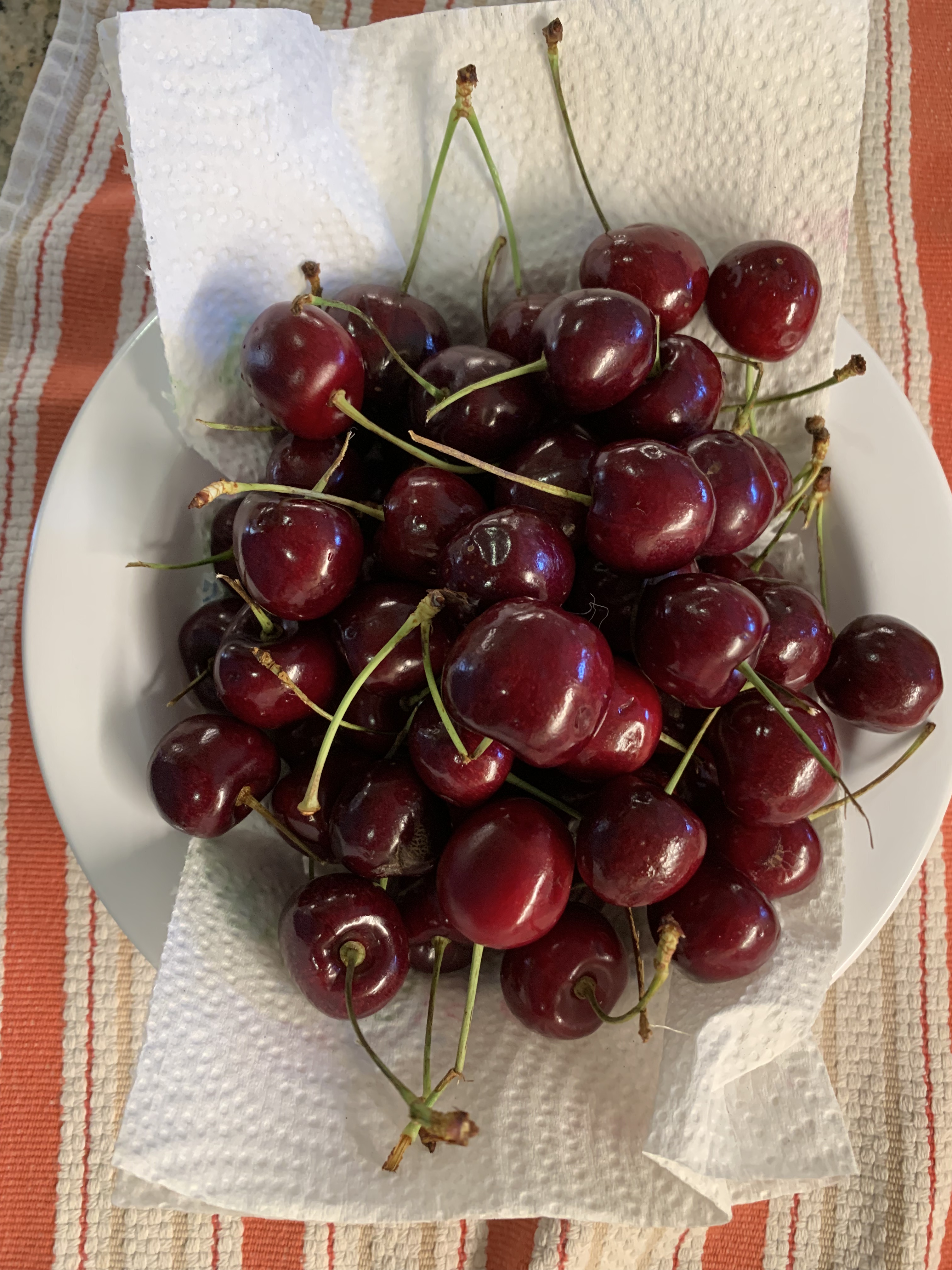
Life may not always be “a bowl of cherries” but nonetheless, a bowl of cherries does illustrate the property of “positive space.” The bowl connotes living things trying to expand right up to the boundaries possible. A bowl that is filled with cherries and even slightly over-filled but without inducing a fear of spillage, to me, connotes life being vigorous and healthy. To me, a single cherry sitting all alone in a large bowl seems to exhibit positive space much less — at least at the scale of the bowl. 

When I look at an individual cherry, I also see positive space. The cherry is not a perfect sphere, featureless and smooth. If it were, to me, it would be a much less positive space. The fact that there is a stem and a noticeable indentation where the stem goes provides a kind of center. So too does the slight asymmetry of the cherry. It appears as though it might have developed as two halves that tried to circle a space at the same time from two different directions – clockwise and counterclockwise. They met and merged to form the almost spherical cherry. 

The cherry is not the only natural food that has this kind of positive space. Think of corn on the cob. Each kernel seems to have tried to grow as large as it can. It pushes up against and into other kernels. Each kernel seems therefore to be “bursting with life.” 

Consider a cucumber. It’s roughly cylindrical. But “roughly” is important here. To me, it would seem much less an example of “Positive Space” if it were literally a cylinder. It tapers at the ends and it bulges at the middle. That seems more “positive.” 

A person who doesn’t understand that life is primarily a cooperative endeavor among all the parts of the vast tree of life, but instead sees the world only as a zero-sum game, it must seem as though the positive living space of a cucumber makes the space around the cucumber less positive and less living. But this is not true! The space around the cucumber’s slightly rotund shape is much more positive and living than the space around a perfect cylinder. 

Think of a tree trunk compared with a telephone pole. They are both made of wood and they are both approximately cylindrical. But a tree trunk feels much more alive to us than a telephone pole. I don’t think this is simply because we “know” a tree is alive. It looks more alive and if you allow yourself to “tune in” to it, it feels more alive. And, importantly, not only does the space that the tree inhabits seem more living. So too does the space around it! A long line of telephone poles may exhibit “Levels of Scale” and “Alternating Repetition” and such a picture may make us feel some life to it. 

Photo by Lerkrat Tangsri on Pexels.com

But a single telephone pole does nothing to stir life in me. In that sense, it’s nothing like a tree. It’s flat and it kills the space on either side as well. The columns in the Parthenon are roughly cylindrical and obviously not literally alive. But they, unlike a telephone pole, have positive space and create positive space around them. Life is not fundamentally a zero-sum game. The bee does not “steal” the flowers pollen and thus damage the flower. The bee helps the flower. The flower helps the bee. Positive space in an object does not steal from or detract from the space around the object. It enhances it! 

Similarly, the “competition” for space among the kernels of corn on a cob of corn shows that competition can be a beautiful thing. I like to see the kernels pushing against each other. All of them seem living and positive. Imagine instead a cob of corn in which one kernel had grown like a giant spider of orange cancer and took up 98% of the cob. Aside from this one ultra-greedy cell, there were only a few widely spaced and shriveled up kernels. Would you pick that from the pile of corn? Would want to slather it with butter and bite into it? I sure wouldn’t! And to me, that is exactly what cruelty, unfairness, and greed look like. It might seem positive — after all, the dictator is trying to “grow.” That is true but he’s rigged the game. Competition is no longer beautiful when the game is rigged. Competition is no longer beautiful when your tennis opponent slices off your leg before the match starts or pays off the chair umpire to call everything you hit out. 

I don’t think there’s anything particularly special about cucumbers or cherries or corn. I just happened to have been washing vegetables before writing this. These radishes also exhibit positive space. And, although their shape is not the same as a cherry or a cucumber, the radishes also enhance the space around them. And, so does the avocado. An avocado that is just past ideal ripeness begins to flatten irregularly and the “pebbles” of the skin also flatten making a less positive space. The pebbles of a perfectly ripe avocado are themselves tiny positive spaces that add to the overall impression of vigor. 

Flowers provide numerous examples of positive space. And, so far as I can tell, the positive space of flowers invariably also enhances the positivity of the space around them. 

Animals also generally exhibit positive space. Their shapes, after all, come about through a struggle among different tradeoffs that have been “learned” by each species over four and a half billion years. But whether you look at the leg of a turtle, the leg of a turkey, or the leg of a polar bear, you will see positive space. The shapes are quite different because their histories are quite different. But in every case, the shape is determined by the history and each of those histories is the same length — 4.5 billion years. The fact that each of these shapes comes about through the dance of trying to survive and thrive in all their various habitats makes every one of them beautiful in its own right — even those whom most of us don’t particularly like to interact with such as rattlesnakes or lions. Even if we don’t wish to come face to face with a lion or grizzly bear we do recognize their beauty. And, I would claim that as those animals walk through any landscape, they will not only exhibit their own positive shape; they will also enhance the positivity of the shape around where they are walking. Think how many times photographers and painters have put an animal in the foreground of a landscape! Of course, doing so makes the scene immediately more living, more interesting, and more beautiful. 

Photo by Anastasia Shuraeva on Pexels.com

What does this have to do with the user’s experience on a computing device? I would have to say that most interfaces on most devices do not do a lot to bring the interface “alive” including having positive space. The tool bar icons on this version of my Mac are very slightly “bulging” like a living cell (or kernel of corn). Even more subtly, the windows have slightly rounded corners. 

It’s an entirely different story with many games though. It seems to me that some of the game artists are among the best artists in the world. They have created many very beautiful games. Could they be more beautiful still if game designers consciously thought about using Christopher Alexander’s “Properties” in general, and “Positive Space” in particular? I think so, but for many games, such as Horizon Zero Dawn, many of the elements are copied so closely from nature that aspects such as “Positive Space” are mostly already taken care of by evolutionary bias toward the beautiful. (Yes, I do think there is such a bias, but it will have to be the subject of a different post.)

What about other applications and systems? Do you think you’ve seen good examples of “Positive Space” in such systems? How could you see incorporating “Positive Space” in UX? 

————————————

Winning by Cheating is Losing

Life Will Find a Way

Math Class: Who are you?

Life is a dance

Myths of the Veritas: The Forgotten Field

“Wizard of Oz”

18 Friday Jun 2021

Posted by petersironwood in Uncategorized

≈ 5 Comments

Tags

HCI, IBM, research, usability, UX, Wizard of Oz

(Some Lessons Learned from studies in Human-Computer Interaction/User Experience conducted at IBM Research in the mid-70’s.)

Photo by Johannes Plenio on Pexels.com

Wizard of Oz 

One of the studies I conducted at IBM Research in the mid 1970’s was part of an effort to do “Automatic Programming” — a department under Pat Goldberg. The first level manager I worked with was Irving Wladawsky (later Irving Wladawsky-Berger). His group wanted to develop a system that would allow the owner/operator of a small business to type requirements into a computer in English (or something English-like) and have the system itself produce RPG code to run the business so described. 

The underlying motivation from an IBM business perspective was that many small businesses could well afford a computer to do inventory, fulfill orders, etc. but they couldn’t afford to hire programmers to create such a system from scratch. The small business owner in the mid-1970’s did not program! Yet, for the most part, they understood how their business worked. The notion was that a natural language understanding and generation program could dialogue with the user/owner and through that process, understand their “business rules.” No costly programmers needed!

Photo by Dmitry Demidov on Pexels.com


An interesting side note: at that time, we were told that IBM corporate forbade us to use the terms “Artificial Intelligence” or “Robotics” to describe our work because some PR firm had determined that these terms were too scary for the general public. So, IBM had research in “mechanical assembly” but not “robotics.” We had work in character recognition, speech recognition, handwriting recognition, automatic program generation, and compiler optimization. But no work in “Artificial Intelligence.” (Wink, wink, nod, nod). 

Labelism: Confusing a thing with the label for that thing.

Another interesting side note: I worked at IBM Research for a dozen years; started an AI lab at NYNEX where I worked another 13 years; came back to IBM Research and several years later found myself working on the same problem! We were still trying to make a system to allow small businesses to generate their code automatically. In my second iteration, rather than using natural language, we were trying to make the specification of business rules in a graph language that was intuitive enough for business owners. This was a different approach, but trying to address the same underlying desire: to bring computing to small business without incurring the heavy costs of programming and maintenance. 

Let’s return to iteration one — the natural language approach @ 1975. Well, one issue was that no-one had a natural language program that even approximated being able to do the job. So…how to study people’s interaction with a system that doesn’t exist? 

We used an approach that my colleague Jeff Kelly called the “Wizard of Oz” technique; viz., use a human being (in this case, me) to simulate how the system might work and record people’s behavior. In this way, we could discover many of the issues that such a natural language programming system would have to deal with. I had already had plenty of experience interacting with a computer; and I had acting experience. I could “play the part” of a computer fairly well as I typed in my questions and answers. 

(Description of “The Wizard of Oz” technique).

IBM Research in Yorktown had roughly a thousand people including not only scientists, programmers, and engineers but also a number of business people (who did not know how to program). I knew some of them from playing tennis and table tennis and we used those folks as initial subjects. What did I find? Good news and bad news. 

Dealing with natural language is tricky for many reasons. One of those reasons is that English, including the English that people normally use to describe their business, is filled with words that have multiple meanings; e.g., “file”, “run”, “program”, “object”, “table”, etc. But here is the good news: although it’s true that many English words have many meanings, when these business people described business procedures, almost all of the lexical ambiguity vanished! The program to understand business English would not have to distinguish between a business file and a nail file; it wouldn’t have to worry about distinguishing a run in baseball or a run in stockings from a run of the payroll program; it wouldn’t have to distinguish between the table in a relational data base and the table in your dining room. The domain would mainly constrain! That’s the good news.

The bad news was dialogue management. How can the machine recognize a misunderstanding and how can it correct it? To make matters worse, while business people were fairly consistent in the way they described how their business ran, they were not consistent in how they talked about the communication. If a human being senses that another one is misunderstanding, then, depending on context they might: raise their eyebrows, say “Huh?”, “Come again?”, “What?” “I think I lost you.” “WTF?” “Are you kidding?”, “We’re on different wavelengths,” “I don’t get it.” “But…wait.” 

Photo by Nafis Abman on Pexels.com

Sometimes, these are referred to as “meta-comments.” Here’s a simple example that took place in the study. 

One of the business people told me about various discounts. I had assumed (playing the part of the computer) that he was talking about discounts for items that were being discounted due to inventory management. I recorded all the various percentages and so on. Then, he said, “Now, we also give discounts for various items.” 

At that time, most natural language systems of that era simply ignored words like “now” and “also” in this context. Stepping out of my role as a “computer system” and thinking about from the perspective of a human conversational partner though, these words are crucial! What it signals is a change in topic. In the larger context of our conversation, it shows that everything that had just been said, which I thought had been about item discounts, was not about item discounts!

This is just one example, but there were many more. In my more recent experience interacting with various computer dialogue systems, being able to recognize the signals of miscommunication and being able to repair misunderstandings is still not very well-handled more than four decades later.

I’d be interested in any pointers you have to a system that you think deals with meta-communication in a natural and robust manner. I do not think that it is beyond the pale of possibility. The general categories of the ways that people misunderstand each other is not infinite. John Anderson developed excellent tutoring systems for LISP and geometry and those systems worked something like human tutors in that, the tutor inferred the mental model of an individual student and focused instruction on correcting any misconceptions. My intuition is that a generic system built with equal complexity could deal with most of the issues as well as the average human being deals with them; i.e., imperfectly. 


—————————————

Lessons Learned: #1 You can test aspects of a system even before it’s built or even completely defined. One method that has been used many times: “Wizard of Oz.” 

Lessons Learned #2: Language used by professionals to talk about their domain is much more constrained in terms of lexical ambiguity than is language when considered by all native speakers.

Lessons Learned #3: People in “our culture” (i.e., US business culture) do not have an agreed upon and consistent vocabulary for talking about communication nor a consistent process for dealing with them.

Lessons Learned #4: Speaking of communication errors, I don’t recall why, but it was about this time, that I realized that my notion about how research results would be transferred to other parts of IBM was a complete and utter fantasy. I hadn’t articulated it, but it was basically that I would do research, write the results up for publication in scientific journals for an academic audience and publish Research Reports which would be eagerly consumed by anyone who needed to know. I’m not proud of this. LOL. But that’s really kind of how I viewed it. And, then, after a few years, I realized that it really mainly came about through relationships. That was something that people had been showing me all my life, but which I don’t think anyone ever stated it explicitly enough.

———————————-

Author Page on Amazon

The Myths of the Veritas (an exploration of leadership & ethics in free, no ads fiction)

Index to a Pattern Language for Collaboration and Teamwork

Experiences in Human-Computer Interaction

Post on “The Story of Story” 

Query By Example

15 Tuesday Jun 2021

Posted by petersironwood in Uncategorized

≈ Leave a comment

Tags

expertise, HCI, IBM, QBE, research, usability, UX

Photo by RF._.studio on Pexels.com

This is part of a series on experiences in my career in Human Computer Interaction and some lessons learned.

I joined IBM Research on the winter solstice of 1973. I had earned a Ph.D. in Experimental Psychology from the University of Michigan and for the previous few years, I had managed a research project at Harvard Medical School on the “Psychology of Aging.” At the time, I was married and had three small children. I mention this because I was funded by so-called “soft money” which basically meant that my salary depended on a research grant. I helped write a renewal of the grant but the decision was “deferred”; that is, it was neither funded nor unfunded. Then, it was deferred again. This meant that if the grant were not funded, I would only have a few weeks to find a new job. That seemed far too short so I began to look other places for a job. 

Lessons Learned: #1 If you want continuity of personnel in your laboratory, make sure you have overlapping and multiple grants or other sources of income. 

In this case, the grant actually was ultimately approved, but by that time, I had already agreed to join IBM Research. That turned out to be fine, by the way. It was a wonderful place to work.

One of the reasons that I got the job at IBM was that I already knew something about computers. I had taken several computer science courses in grad school along with the needed psych courses. More importantly, our “Psychology of Aging” study was run by a PDP-8 and I had programmed the computer to run our suite of experiments and to do data analyses on the results. I had taken a week-long course at DEC in Maynard, Massachusetts on the assembly language, another week-long course on the machine language, and another week-long course actually tracing the circuitry with a probe and oscilloscope. I felt I “understood” the PDP-8 at a fairly deep level. 

At IBM, I did not have that familiar machine. Instead, I was connected to a mainframe via a dumb terminal. The first day at IBM, I got my userid and tried to log on to APL (A programming language I had not used before). I tried following the manual but I could not seem to get logged on. After hours of trying, I finally gave up and went down to the computer room and found someone willing to help. I showed him the logon instructions I was trying to follow and he immediately said, “Oh, yeah, that doesn’t work any more. We changed that months ago. Here’s how you need to do it now.” The manual I had may have looked new, but it was out of date. 

Lessons Learned: #2 Manuals can be wrong. These days, most are online. But they can still be wrong.

Lessons Learned: #3 Someone who knows how to do something can save you hours with a few minutes of their time. 

Of course, it’s more respectful, efficient, and a better learning experience if you can figure it out on your own. But sometimes you can’t. My stumbling block was not due to an error in logic, or a lack of in-depth knowledge. It was simply that the computer center administrators had changed something arbitrary so that the documentation I was given about how to log on for the first time was no longer accurate. 

In order to teach myself APL, I wrote a very small program to “predict” how long I was going to live “based on” some behaviors that I was interested in controlling. My main goal was to learn APL. My secondary goal was to motivate myself, for instance, to exercise more, lose weight, and not drink too much alcohol. I had no intention or pretensions of making this prediction “accurate.” If I had been doing a consulting gig for an insurance company setting life insurance rates, for example, I would have given far more attention to see precisely what the real data were and incorporated many more variables into the regression model. 

Here’s a link, 

https://www.death-clock.org

by the way, to a more accurate model than the one I used, but it’s still simple to use. Note that my goal was to motivate myself and so I intentionally exaggerated the impact of those behaviors I was trying to change. I had programmed it. I knew how “bogus” the calculation was — nonetheless — here’s the interesting thing though: 

Lessons Learned #4: Even an over-simple model that the user knows is over-simple can still motivate change. 

Photo by Mike on Pexels.com

At last we come to the actual project I worked on — the usability and learnability of Query By Example. One of my colleagues, Moshe Zloof, invented the language for relational data bases. He had designed the language but not yet implemented it. I did not immediately test the design; first, I sought to understand it. In seeking to understand it in depth, prior to testing it, the two of us had some sense-making discussions. Moshe improved the design; in particular, our discussions uncovered some ambiguities and inconsistencies that were not at all obvious when he simply gave talks about the design. This brings me to the next lesson learned which has proven true in nearly every study of early stage designs that I’ve been involved with over the course of five decades.

Lessons Learned #5: Don’t just accept a surface description of something; understand it as deeply as you can before designing a study.  

In this particular case, it was possible for me to understand it in some depth. Relational data bases and second order logic are things I was capable of understanding. If it had been an interface to running a nuclear reactor or using the artificial heart that Moshe had designed earlier in his career, that would have been a much more difficult task for me.

I wanted to understand, not just the “logic” of Query By Example, but also possible contexts of use. For instance, my manager & I visited Burlington, Vermont to talk with IBMer’s who actually used query languages to understand what was happening in chip production lines. At one point, a particular production line that had been producing nearly 100% perfect chips starting having a much higher error rate. Using their query facility, they were quickly able to diagnose the cause of the change which was a supplier of one of the raw materials using a different source. In turn, this meant a slightly different profile of trace impurities in the substrate. Of course, this is only one example, but to me, understanding something in depth means not only understanding its internal logic but also understanding real users, their real tasks, and their context of use. 

Photo by Chokniti Khongchum on Pexels.com

I won’t go into all the details of the pencil & paper study or the results. High School students and then college students were taught the basics of the language and then given a simple relational data base and a set of questions stated in English which they had to translate into Query By Example. Briefly, the bottom line was that Query By Example was easy to learn and easy to use. However, there were still questions that people had difficulty with. In analyzing the data and doing some further experiments, the difficulties that people tended to have, stemmed not so much from Query By Example per se, but from what I much later came to call “labelism” — that is, confusing a label with the thing that label refers to. 

Here’s a simple example of the type of confusion we saw. In Query By Example (and other query languages) there is usually an OR operator and an AND operator. (These operators can be important for doing advanced queries with search engines as well). If you are interested in getting a list of pets you might adopt and you’re willing to adopt dogs or cats, you might ask for “cat OR dog.”  If you only want long-haired cats, you might ask for “cat” AND “long hair.” 

English, however, can be tricky.

If you and I (as opposed to you and a query language) are having a conversation, you might say, “I hear there are many pets that need to be adopted.” 

I say, “Yes, there are all kinds of pets. There are snakes, dogs, turtles, rabbits, cats…” 

You say, “Let me stop you right there. I’m only interested in adopting cats and dogs. Those are the only animals I’d want to adopt.” 

See what you said there? You exact words included: “…cats and dog.” If you put “Cats AND dogs” into a query against the data base of available pets, however, you will get the null set (that is, nothing) back. There are no animals who are both cats and dogs! (Though my part Main Coon cats do play fetch like dogs). 

When people were presented with an English statement that included the English word “and” — regardless of the actual syntax and context, some of them had difficulty using the OR operator. If instead, the query in English had set up like this: “Oh, I don’t want reptiles. I’d be happy with adopting a cat or a dog, however” then, they’d have no problem translating it into the OR operator in the query language. 

Lessons Learned: #6 Sometimes the difficulty people have in using a product, a service, or a prototype is not due to the interface details but with the structure of the task, their background, and their training.  

By analogy, you will not allow me to beat Nadal or Djokovic at tennis by giving me a better tennis racquet! (Although if you gave one of them a toothpick for a tennis racquet, I might have a shot).

Photo by Isabella Mendes on Pexels.com


That sounds obvious and even absurd, but I promise you, some companies get so greedy that they want you to design a system that allows people who do not understand the task and have minimal background and training to nonetheless be able to perform that task. 

One example you may have run into is having “help desk” personnel who have no understanding of a product go through a script to help you “solve your problem.” Sometimes, it works. But many times it doesn’t. When it does not work, you might not be able to “fix” the system by making the interface to the scripts easier to use for the help desk folks. The problem is much deeper (in some cases). Yes, a really bad interface can make it difficult even for a really knowledgeable and capable person to do the job. But often, even a really great interface cannot always substitute for actual expertise.

——————————————————-

Essays on America: Labelism 

Other posts on problem formulation: 

The Doorbell’s Ringing

Reframing the Problem

I Say Hello

I Went in Seeking Clarity

Who Knows What?

Measure for Measure

Career Advice from Polonius

20 Saturday Mar 2021

Posted by petersironwood in Uncategorized

≈ 1 Comment

Tags

career, HCI, human factors, usability, UX

Photo by Ott Maidre on Pexels.com

Career Advice from Polonius: To Thine Own Self be True

“To thine own self be true.” This advice comes from Polonius who is giving advice to his son in Act I, scene 3 of Shakespeare’s Hamlet. 

Polonius says: “This above all: to thine own self be true. And it must follow, as the night the day, Thou canst not then be false to any man.”

Let’s focus on the first part. 

One of the dreams of education is to customize teaching to the specific learning style(s) of individual students. This was a hot topic when I was in graduate school.

Photo by Suliman Sallehi on Pexels.com


Around 50 years ago. 

Some day, your grandchildren or your great-grandchildren may be the beneficiaries of learning experiences that are individualized to their specific styles. I wouldn’t hold my breath, but it could happen. It isn’t only a question of research on what various styles are and how to present material that resonates with these various styles. There is also the question of priorities and dollars and personnel. 

But meanwhile, here’s the good news. You don’t have to wait for another 50 years of research and a reshuffling of priorities so folx spend more money on education and less on, let’s say, cosmetics and professional sports. As I say, don’t hold your breath.

But let’s get back to the good news. The good news is that you can discover for yourself how to maximize your own learning as well as what your particular talents are. 

One cautionary note: Don’t be a jerk about it. If you’re in a group dealing with grief, don’t say, “Well, I learn best if a subject is reduced to a few hundred polynomial formulae. So, let’s start right there. Let’s reduce grief to three dimensions. Later, of course, we can do a proper multidimensional scaling exercise to determine the optimal number of dimensions.”

Photo by Andrea Piacquadio on Pexels.com


No. Don’t say that. Of course, you’re free to suggest that approach, but chances are, in this situation, and in most realistic group situations, you will be treated to information in the same manner as many others who have different styles from yours.

However, in many situations, you are, far and away the main important stakeholder. You can use your knowledge of how things work for you in order to strategize and plan how you will learn about things. You can organize and arrange your work so you’ll be more productive. 

Here’s a trivial example. I have learned that my eyes have a wisdom of their own. If, for instance, I’m going out for a walk around the garden to take some pictures of the sunset on the flowers, I grab my stuff and find myself turning and staring at the hat-rack on the way out the door. When I was younger, I would ignore this. But what I have learned is that my eyes are really good at knowing what to look at. So, even if I’m in a hurry, I take a moment to reflect on why my eyes are looking there. And, then, it comes to me. I’ll do better if I wear a brimmed hat to keep the sun out of my eyes while I look at my iPhone.


By paying attention to this little quirk, I’ve saved myself a lot of grief over the years; e.g., not left the house without my wallet, etc.

Here’s another example. I’m very good at seeing “patterns” emerge from a small number of examples or when there is considerable noise involved. This serves me well as my hearing diminishes because I can use top-down processing. Generally, but not always, I understand what people are saying. If I try to listen to a foreign language tape that is only isolated audio words, I have no hope of knowing what they are saying. “Key” “Tee”, “Pea”, sound exactly the same.

Seeing patterns easily is generally a nice capacity. However, I’m horrible at finding my own typos immediately after I write something. I actually “see” what I meant to type. A week later, I’m pretty good at catching the errors. If I had more patience, I would wait a week to proofread for every blog post, but being patient isn’t a strength either. I do go back over old posts occasionally and fix the typos (which I never saw at the time). 

Photo by Frank Cone on Pexels.com

When I go to the movies — remember when we used to go to movies? — anyway, if I went to a comedy, I was very likely to laugh too soon. I “hear” the punchline two lines earlier than it actually occurs. There’s no benefit to my laughing early! But that’s when the punchline hits me. I do keep it soft so as not to disturb the others in the audience. On the other hand, I’m pretty good at “discovering” the playing patterns of my tennis opponents and anticipating what they are going to do. Naturally, I don’t always guess right, but I do way better than chance.

I bring up these examples to illustrate a generality; that most of these individual differences have an upside and a downside. Mainly, learning about my own styles and capacities is something I learned well after leaving high school. That makes sense. In school — or at least, the schools I went to — everybody got the same instruction in the same way almost all the time. But as an adult, you often have a lot of control over your own timing, flow of information, etc. I think it’s worth your while to look back at your experience and discover what you have difficulty with, what you’re OK at and what you are exceptionally good at. When you have a choice, use the approach you’re really good at. 

—————————————-

More background on “knowing yourself” 

https://en.wikipedia.org/wiki/Know_thyself

History of Know Thyself

Problem Formulation: Who Knows What?

18 Monday Jan 2021

Posted by petersironwood in Uncategorized

≈ 5 Comments

Tags

browser, HCI, problem formulation, problem framing, problem solving, query, search, thinking, usability, UX

Photo by Nikolay Ivanov on Pexels.com

This post focuses on the importance of discovering who knows what. It’s easy to think (without thinking!) that everyone knows what you know. 

At IBM Research, around the turn of the century, I was asked to look at improving customer satisfaction about the search function on IBM’s website. Rather than using someone else’s search engine, IBM used one developed at IBM’s Haifa Research lab. It was a very good search engine. Yet, customers were not happy. By way of background, it’s worth noting that compared with many companies who have websites, IBM’s website was meant for a wide variety of users and contained many kinds of information. It was meant to support people buying their first Personal Computer and IT experts at large banks. It had information about a wide variety of hardware, software, and services. The site was designed to serve as an attractor for investors, business partners, and potential employees. In other words, the site was vast and diverse. This made having a good search function particularly important.  

A little study of the existing data which had been collected showed that the mean number of search terms entered by customers was only 1.2. What?? How can that be? Here’s a website with thousands of products and services and designed for use by a huge diversity of users and they were only entering a mean of 1.2 search terms? What were they thinking?!


Of course, there were a handful of situations when one search term might work; e.g., if you wanted to find out everything about a specific product that had a unique one-word name (which was rare) or acronym. For most situations though, a more “reasonable” search might be something like: “Open positions IBM Research Austin” or “PC external hard drives” or “LOTUS NOTES training.” 

We invited a sample of users of IBM products & services to come into the lab and do some tasks that we designed to illuminate this issue. In the task, they would need to find specified information on the IBM website while I observed them. One issue became immediately apparent. The search bar on the landing page was far too small. In actuality, users could enter as many search terms as they liked. Their terms would keep scrolling and scrolling until they hit “ENTER.” The developers knew this, but most of our users did not. They assumed they had to “fit” their query into the very small footprint that presented itself visually. Recommendation one was simply to make that space much larger. Once the search bar was expanded to about three times its original size, the number of search terms increased dramatically, as did user satisfaction. 

In this case, the users framed their search problem in terms of: “How can I make the best query that fits into this tiny box.” (I’m not suggesting they said this to themselves consciously, but the visual affordance led them to that constraint). The developers thought the users would frame their search problem in terms of: “What’s the best sequence of terms I can put into this virtually infinite window to get the search results I want.” After all, the developers knew that any number of terms could be entered. 

Although increasing the size of the search bar made a big difference, the supposedly good search engine still returned many amazingly bad results. Why? The people at the Haifa lab who had developed the search engine were world class. At some point, I looked at the HTML of some of the web pages. Many web pages had masses of irrelevant metadata! I found some of the people who developed these web pages and discussed things with them. Can you guess what was going on?


Many of the developers of web pages were the same people who had been developing print media for those same products and services. They had no training and no idea about metadata. So, to put up the webpage about product XYZ, they would go to a nice-looking web page about something else, say, training opportunities for ABC. They would copy that entire page, including the metadata, and then set about changing the text about ABC to text about product XYZ. In many cases, they assumed that the strange stuff in angle brackets was some bizarre coding stuff that was necessary for the page to operate properly. They left it untouched. Furthermore, when they “tested” the pages they had created about XYZ, they looked okay. The information about XYZ was there. Problem solved.

Only of course, the problem wasn’t solved. The search engine considered the metadata that described the contents to be even more important than the contents themselves. So, the user would issue a query about XYZ and receive links about ABC because the XYZ page still had the “invisible” metadata about ABC. In this case, many of the website developers thought their problem was to put in good data when what they really needed to do was put in good data and relevant metadata. 

A third issue also revealed itself from watching users. In attempting to do their tasks, many of them suggested that IBM should provide a way for more than one webpage to appear side by side on the screen so that they could, for instance, compare features and functions of two different product models rather than having to copy the information from the web page about a particular model and then compare their notes to the second page. 

Good suggestion. 

Of course, IBM & Microsoft had provided this function. All one had to do was “Right Click” in order to bring up a new window. Remember, these were not naive users. These were people who actually used IBM products. They “knew” how to use the PC and the main applications. Yet, they were still unfamiliar with the use of Right Click. Indeed, allowing on-screen comparisons is one of the handiest uses of Right-Click for many people. 

This issue is indicative of a very pervasive problem. Ironically, it is an outgrowth of good usability! When I began working with computers, almost nothing was intuitive. No-one would even attempt to start programming in FORTRAN or SNOBOL, let alone Assembly Language or Machine Code without looking at the manual. But LOTUS NOTES? A browser? A modern text editor? You can use these without even looking at the manual. That’s a great thing. But — 

…there’s a downside. The downside is that you may have developed procedures that work, but they may be extremely inefficient. You “muddle through” without ever realizing that there’s a much more efficient way to do things. Generally speaking, many users formulate their problem, say, in terms like: “How do I create and edit a document in this editor?” They do not formulate it in terms of: “How do I efficiently create and edit a document in this editor?” The developers know all the splendid features and functions they’ve put into the hardware and software, but the user doesn’t. 

It’s also worth noting that results in HCI/UX are dependent on the context. I would tend to assume that in 2021 (when I first published this post), most PC users knew about right-clicking in a browser even though in 2000, none of the ones I studied seemed to realize it. But —

I could be wrong. 

————————————

The Invisibility Cloak of Habit

Essays on America: Wednesday

Index to a catalog of “best practices” in teamwork & collaboration. 

Author Page on Amazon

Getting Into (the “right”) Shape

07 Monday Sep 2020

Posted by petersironwood in Uncategorized

≈ 1 Comment

Tags

cats, consumer products, Design, form, function, HCI, human factors, kittens, usability, UX


A truism we have all heard is that “form should follow function.”  I tend to agree with this as a good general principle, but only if the designer has given more than 30 milliseconds of thought about what the actual function is. Even better is to observe function being used in practice.  Below, I give examples of how form may look like function but not actually follow (actual) function.

The first comes from the complex and technical domain of nail clippers.  My nails are tough and I actually need to use toenail clippers to cut my fingernails.  But the same principle applies to both fingernail clippers and toenail clippers.  I see many many examples where the designer has attempted to curve the surface of the nail clipper to “match” the curve of nails.  This is a brilliant idea, but only if every nail on every human being on the planet has the same curvature.  A priori, I would tent to think this is not the case, but being empirically oriented I decided to test it out by actually looking at real nails.  I looked at my thumbnail and the fingernail on my little finger.  Sure enough, my hypothesis was borne out.  They are NOT the same.  What this means is that a nail clipper that is curved so that it fits my pinkie will wreak havoc when applied to my thumbnail.  I am probably going out on a limb here, but I suspect that if one were to include fingernails from other people in this sample, one might find an even wider variation in curvature.  What are people thinking when they make curved nail clippers? I can only speculate that they have never looked at the fingernails of more than one person and that, indeed, they never looked at more than one fingernail on that one person.

Image

Image

If only there were a solution.  Sigh.  Oh, wait!  There is a solution. Make the cutting surface of the nail clippers flat.  This enables the person to clip nails of any curvature.  It does, of course, require multiple cuts.  It has the added advantage, that if you so wish, you can sharpen your nails so they resemble cat claws.

Image

Cats bring me to my second example.  When we moved to California amid a large garden, we wanted to let our cats to spend most of their time outdoors, partly so litter box cleaning would be at a minimum.  Unfortunately, we soon discovered that while the outdoors here offers many opportunities for cats to be hunters of lizards and mice, it also offers even more opportunities for them to be prey for bobcats, cougars, eagles, and especially coyotes.

Now, here is a beautifully shaped litter box (a gift).  It even has a place for the cats to clean their paws before they track litter back into the living room.  Nice.  Unfortunately, this is a beautiful shape by someone who has never cleaned a litter box, at least not by litter box shovel.  Perhaps they clean litter boxes with their bare hands?  Anyway, this curved shape does not jibe well with the typical litter box shovel.  Of course, the cats could choose to do their business along the gently curving side of the litter box.  And, of course, they never do.  They choose instead the places along the edge of the litter box where there is maximum curvature.

Image

Image

The idea that there is a place for the cats to clean their feet before venturing back out into the living room or pouncing up on the kitchen counter is a sweet idea.  It is an idea that would never occur to the owner of an actual cat, however.  Here are two cats we obtained from a shelter (Tally on the left, Molly on the right).

Image

They are cute, but defective in that they do not speak English, nor so far as I have been able to discover, any other language.  So, despite my explanations that they are supposed to wipe their feet on the way out of the litter box, they do not.  Instead, they do their business on the foot-wiping section of the litter box.  So, apart from the annoying high curvature, if you are unlucky enough to get a cat who either does not understand complex sentences or just doesn’t care, this is probably not the litter box for them either.  It might work for cats who: 1) speak your language fluently and 2) are cooperative. (Recent estimates indicate the total number of such cats is zero).

The third example comes from health care and is a bit more abstract.  On my insurance ID card is a field which is labeled: “Identification number.”  In order to use this, I have to go to their website and “register.”  In order to register, the website says I need to enter my “identification number.” But in actuality, that does not work!  No.  Instead, I am supposed to leave off the first three characters in what is labeled my identification number.  The website doesn’t say this.  But the help desk is quite familiar with the issue and will happily explain it to you after you listen to musak for three or four hours.  This is not so much shape not matching real function, but label not matching function.

The fourth example comes from some of our “bookcases.”  Why, I hear you ask, are there scare quotes around bookcases.  I will tell you why.  I put scare quotes because although the shelves are flat and just the right size for books, and although this piece of “furniture” is sold as a bookcase, in fact, it is a nick-knack shelf.  My wife and I foolishly tried filling it with books and it collapsed.  So, in this case, the label and the shape lead one to believe it serves a particular function but the underlying functionality is insufficient to fulfill that dream of ours (that the “bookshelf” would actually hold books).


grey metal hammer

Photo by Pixabay on Pexels.com


The fifth example comes from my experience with companies who want to simplify things for their customers.  That sounds worthwhile.  So, they launch major efforts to make their products “consistent.” But they soon learn that making products behave consistently years after they were independently developed is way too expensive.  So instead, they focus on making them look the same and using consistent terms across products, while leaving the underlying functionality behave quite differently.  To me, this is quite akin to the bookshelf case. Making things look the same while continuing to have them act differently is actually worse for the user than having things that act differently also look different! 


Photo by Pixabay on Pexels.com


The moral of the story? It’s fine to have form follow (and signal) function, but you need to understand how users actually behave. They won’t necessarily behave as you imagine they are supposed to any more than a cat will read your mind in order to please you. Of course, if you see yourself, not as a partner of your users, but rather out to deceive them into thinking they are buying and using something different from what they really are… 

—————————————

Introduction to Pattern Language for Collaboration and Cooperation.

Index for Collaboration Patterns  

Author Page on Amazon

Using Stories and Storytelling 

What do you do when the client insists you solve the “wrong” problem? 

← Older posts

Subscribe

  • Entries (RSS)
  • Comments (RSS)

Archives

  • December 2025
  • November 2025
  • October 2025
  • September 2025
  • August 2025
  • July 2025
  • June 2025
  • May 2025
  • April 2025
  • March 2025
  • February 2025
  • January 2025
  • December 2024
  • November 2024
  • October 2024
  • September 2024
  • July 2024
  • April 2024
  • March 2024
  • February 2024
  • January 2024
  • December 2023
  • August 2023
  • July 2023
  • May 2023
  • April 2023
  • March 2023
  • February 2023
  • January 2023
  • December 2022
  • November 2022
  • October 2022
  • September 2022
  • August 2022
  • July 2022
  • June 2022
  • May 2022
  • April 2022
  • March 2022
  • February 2022
  • January 2022
  • December 2021
  • November 2021
  • October 2021
  • September 2021
  • August 2021
  • July 2021
  • June 2021
  • May 2021
  • April 2021
  • March 2021
  • February 2021
  • January 2021
  • December 2020
  • November 2020
  • October 2020
  • September 2020
  • August 2020
  • July 2020
  • June 2020
  • May 2020
  • April 2020
  • March 2020
  • February 2020
  • January 2020
  • December 2019
  • November 2019
  • October 2019
  • September 2019
  • August 2019
  • July 2019
  • June 2019
  • May 2019
  • April 2019
  • March 2019
  • February 2019
  • January 2019
  • December 2018
  • November 2018
  • October 2018
  • September 2018
  • August 2018
  • July 2018
  • June 2018
  • May 2018
  • April 2018
  • March 2018
  • February 2018
  • January 2018
  • December 2017
  • November 2017
  • October 2017
  • September 2017
  • August 2017
  • July 2017
  • June 2017
  • May 2017
  • April 2017
  • March 2017
  • February 2017
  • January 2017
  • December 2016
  • November 2016
  • October 2016
  • September 2016
  • August 2016
  • July 2016
  • June 2016
  • May 2016
  • April 2016
  • March 2016
  • February 2016
  • January 2016
  • December 2015
  • November 2015
  • October 2015
  • September 2015
  • August 2015
  • May 2015
  • January 2015
  • July 2014
  • January 2014
  • December 2013
  • November 2013

Categories

  • AI
  • America
  • apocalypse
  • cats
  • COVID-19
  • creativity
  • design rationale
  • driverless cars
  • essay
  • family
  • fantasy
  • fiction
  • HCI
  • health
  • management
  • nature
  • pets
  • poetry
  • politics
  • psychology
  • Sadie
  • satire
  • science
  • sports
  • story
  • The Singularity
  • Travel
  • Uncategorized
  • user experience
  • Veritas
  • Walkabout Diaries

Meta

  • Create account
  • Log in

Blog at WordPress.com.

  • Subscribe Subscribed
    • petersironwood
    • Join 664 other subscribers
    • Already have a WordPress.com account? Log in now.
    • petersironwood
    • Subscribe Subscribed
    • Sign up
    • Log in
    • Report this content
    • View site in Reader
    • Manage subscriptions
    • Collapse this bar
 

Loading Comments...